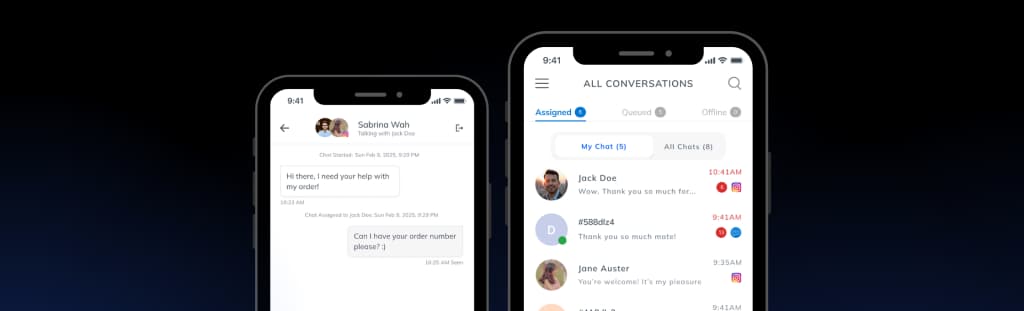
WhatsApp Customer Support with a Shared AI Inbox
Manage WhatsApp Business conversations from one LenoChat support inbox. Reply from your team, answer customer questions with AI, and stay inside the 24-hour service window.

What is LenoChat for WhatsApp?
LenoChat for WhatsApp connects your Business account to a unified support inbox. Your team can reply, answer questions, and resolve issues without staying inside the app. The AI Agent handles common questions, while AI Copilot suggests replies agents can edit before sending. LenoChat helps your team stay inside the 24-hour customer service window and manage approved template messages for follow-ups when needed. It works through the official WhatsApp Business API and does not broadcast, mass-message, or modify your Business profile. Shopify, WordPress, Instagram, and Facebook Messenger are supported in the same inbox.
Everything You Need to Support Customers in Business Messages
Reply to WhatsApp Business Messages from Your Dashboard
Manage every Business conversation from LenoChat's unified inbox. Your team can see new messages, reply in context, and keep conversations from other channels in the same workspace.

Access Full Conversation History Instantly
See each customer's conversation history across channels. When someone messages your Business account, your team can review past messages, earlier issues, read-receipt context, and previous follow-ups in one place.

Let AI Handle Common WhatsApp Questions
Train LenoChat AI with your content so it can answer common message questions. Your AI agent gives fast replies about products, pricing, shipping, and policies while your team handles complex requests.

Get AI-Powered Reply Suggestions
Leno AI Copilot suggests replies based on the conversation context. Agents get draft answers they can edit, send during the service window, or adapt for approved template follow-ups.

Assign Conversations to the Right Team Member
Route conversations to the right agent based on topic or expertise. Your team can collaborate, leave internal notes, and make sure every message gets a timely response.

More Features
Leno AI Agent & Copilot
AI-assisted customer support
Leno AI Agent can answer common questions automatically, while Leno AI Copilot suggests replies during live chats to help your team respond faster and more accurately.
Explore Leno AI→One Inbox for All Customer Messages
Multi-channel support, in one place
Manage messages from your website, Shopify store, Instagram, Facebook, and this channel in a single inbox. Your team can respond faster without switching tools.
Learn About One Inbox→Support Customers in Their Language
Built for global customers
Use LenoChat in your preferred language while supporting customers from different regions. Designed to make cross-language communication clearer and more efficient.
View Language Support→Follow our step-by-step guide to connect your Business account and start managing conversations from LenoChat in minutes.
See Integration GuideFrequently Asked Questions
What is LenoChat for WhatsApp?
LenoChat for WhatsApp is a WhatsApp Business inbox and AI reply tool. It connects your Business account to a unified support inbox so your team can answer from one place.
How do I connect this channel to LenoChat?
Connect your Business account to LenoChat in a few simple steps: link the Business API, verify your number, and start receiving messages in your LenoChat inbox.
Does LenoChat work with WhatsApp Business?
Yes. LenoChat integrates through the official WhatsApp Business API. You need a WhatsApp Business account and a verified phone number to connect.
Can LenoChat AI answer customer messages automatically?
Yes. LenoChat AI can answer common customer questions automatically. You stay in control — agents can review, edit, or take over any conversation at any time.
Will connecting LenoChat affect my WhatsApp account?
No. LenoChat only reads and replies to customer-initiated messages through the official WhatsApp Business API. It does not broadcast, mass-message, or modify your Business profile.
Can I use LenoChat with other channels too?
Yes. LenoChat works across Shopify, WordPress, Instagram, and Facebook Messenger — all in one inbox alongside your Business conversations.
Is LenoChat suitable for small businesses using this channel?
Yes. LenoChat is built for small and growing businesses. You get the essential features without a complex setup or enterprise pricing.
Does LenoChat support multiple agents?
Yes. You can add team members, assign roles, and manage permissions. All agents see conversations, customer details, and chat history in real time.
What happens outside of chat operating hours?
LenoChat can let AI answer basic questions while your team is away. You can also set auto-replies and follow up from the inbox later.
Can I send template messages from LenoChat?
Yes. You can use pre-approved message templates for outbound communication, order updates, and follow-ups directly from LenoChat.
Is LenoChat free?
Yes. LenoChat has a free plan with core features included. Paid plans unlock higher AI usage limits, supervision tools, and additional channel integrations.
Available for teams on iOS and Android
Support Customers on the Go